
Key takeaways
- Five kids tablets compared for family travel and learning games, covering screen size, parental controls, storage, battery life and included cases.
What's inside
As an Amazon Associate I earn from qualifying purchases. This post may contain affiliate links at no extra cost to you.
- Top Pick: Amazon Fire HD 10 Kids Pro tablet, Nebula
- Runner-up: Amazon Fire HD 8 Kids tablet (newest model, 2024), Blue, 32 GB
- Also consider: Amazon Fire 7 Kids tablet, Blue, 16 GB
A kids tablet has to survive two very different jobs. At home it is a shared device for games, reading apps, and homework-adjacent activities, passed between siblings and occasionally dropped on hard floors. On the road it becomes the long-drive and waiting-room device, where battery life and a case that doubles as a stand matter more than raw speed. Parental controls sit underneath both jobs, because the tablet is only useful to a family if an adult can set the boundaries once and stop thinking about them.
This guide compares five tablets built specifically for children. Three are Amazon Fire Kids models aimed at different ages and screen sizes, one is a LeapFrog learning tablet with preloaded educator-approved apps, and one is an Android option from Contixo. Age guidance and control features below are stated exactly as the listings give them.
As an Amazon Associate, we earn from qualifying purchases.
Quick answer
For older children ages 6 to 12, the Fire HD 10 Kids Pro offers the biggest screen and longest listed battery life. The Fire HD 8 Kids suits ages 3 to 7 with a sturdy Kid-Proof Case, the Fire 7 Kids is the smaller budget-friendly travel size, the LeapFrog LeapPad Academy focuses on preloaded learning apps, and the Contixo K102 adds a 10-inch Android screen with Disney storybooks.
Amazon Fire HD 10 Kids Pro tablet, Nebula

The Fire HD 10 Kids Pro is the pick for older children, with the listing aiming it at ages 6 to 12. The 10.1-inch HD screen, described in the page copy as a 1080p Full HD display, is the largest here and suits chapter-book reading apps, drawing, and video on long trips. Storage is 32 GB, and the battery is listed at up to 13 hours, the longest runtime in this group alongside the Fire HD 8 Kids.
Instead of the thick bumper case on the younger-kid models, this one comes with a slim case designed for older kids, which keeps the tablet lighter in a backpack. Content is ad-free, and parental controls run through the Parent Dashboard, so adults can manage what the tablet offers from their own phone. The purchase includes 1 year of Amazon Kids+, and the tablet carries a 2-year worry-free guarantee, which is the replacement promise Amazon attaches to its Kids editions if the device breaks.
This is the model to choose when the child has outgrown preschool content and the tablet will be used for several years of school-age reading, games, and travel entertainment.
Amazon Fire HD 8 Kids tablet (newest model, 2024), Blue, 32 GB

The Fire HD 8 Kids is aimed at ages 3 to 7 and is the middle option in the Fire lineup. Its 8-inch HD touchscreen has a 1280 x 800 resolution, and the 2024 release pairs a hexa-core 2.0 GHz processor with 3 GB of RAM, so it should feel responsive for the apps and videos a young child uses. Storage is 32 GB, and battery life is listed at up to 13 hours, which covers a full day of travel without a charger.
The defining feature at this age is the Kid-Proof Case, the thick protective bumper that helps the tablet survive drops and rough handling by small children. Like the other Fire Kids models, it includes a 2-year worry-free guarantee.
One detail needs care: the included Amazon Kids+ duration is worded differently across listings for this model, with one 2024 listing describing 6 months, so treat the exact subscription length as not stated and confirm it on the product page before buying. This tablet fits families who want a mid-size screen, a protective case, and parental controls for a preschool or early-elementary child.
Amazon Fire 7 Kids tablet, Blue, 16 GB

The Fire 7 Kids is the smallest and simplest option here, also aimed at ages 3 to 7. The 7-inch SD touchscreen is a step down in sharpness from the HD models, but the smaller body is easier for little hands to hold and lighter in a travel bag. Battery life is listed at up to 10 hours, enough for a long drive or a flight with time to spare.
Storage starts at 16 GB and can be expanded up to 1 TB with a microSD card, which is useful for downloading shows and games before a trip with no reliable connection. The Kid-Proof Case has a built-in stand for tabletop viewing. The purchase includes 1 year of Amazon Kids+ and the same 2-year worry-free guarantee as the other Fire Kids tablets.
Parental controls run through the Parent Dashboard and, as listed, include age filters, educational goals, and time limits, so adults decide what appears and for how long. Choose this model when the tablet is mainly a travel and starter device, or when a second tablet is needed for a younger sibling.
LeapFrog LeapPad Academy Kids’ Learning Tablet, Green
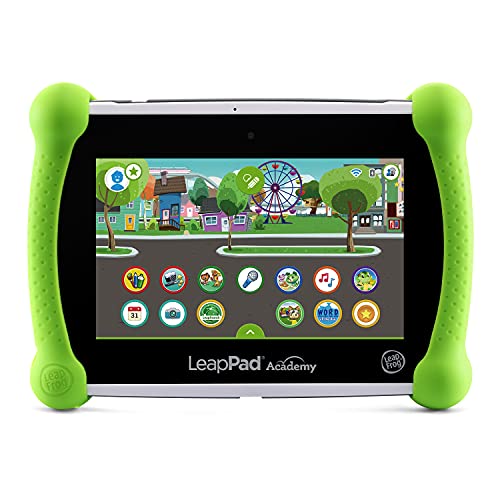
The LeapPad Academy takes a different approach from the Fire models: it is a closed learning tablet rather than a general entertainment device. It is intended for ages 3 to 8 and comes with 20 educator-approved apps preloaded, so it works out of the box without an app store. The 7-inch screen has a 1024 x 600 resolution, storage is 16 GB, and a stylus is included for drawing and writing activities.
The hardware is built for young children, with a shatter-safe LCD screen and a removable silicone bumper that includes a kickstand. Parental controls, as listed, cover time limits and the ability to approve kid-friendly websites, which gives adults oversight without opening the full internet. A 3-month free trial of LeapFrog Academy is included for families who want the extended learning service after trying the preloaded content.
This is the pick for parents who prefer a curated, education-first device with no open app store at all. Families who mainly want streaming video and a wide game library will be better served by one of the Fire tablets.
Contixo 10″ Android Kids Tablet (K102), Pink

The Contixo K102 is the Android alternative in this group. Its 10-inch screen matches the Fire HD 10 Kids Pro for size, and it carries 32 GB of storage. The listing highlights a bundle of more than 80 Disney storybooks included with the tablet, which gives it an immediate reading library for young children.
Parental controls are included, and the package comes with a kid-proof case that has a kickstand, plus a stylus for drawing and writing practice. Because it runs Android rather than the Amazon or LeapFrog ecosystems, it suits families who are already comfortable with Android devices and want a large screen without joining the Amazon Kids+ subscription model after any included period ends.
Details such as a stated battery life in hours and an age range are not given in the listing material reviewed here, so confirm those on the product page if they are deciding factors. This model fits families who want a big-screen Android tablet with storybook content included from day one.
How to choose
Match the tablet to the child’s age first. The listings split cleanly: the Fire HD 8 Kids and Fire 7 Kids target ages 3 to 7, the LeapPad Academy covers ages 3 to 8, and the Fire HD 10 Kids Pro is built for ages 6 to 12. A tablet bought for a six-year-old who will keep it for three years should come from the older bracket.
Then weigh screen size against portability. Ten-inch screens are better for reading and shared viewing at home, while 7-inch tablets are lighter for small hands and car seats. Battery life matters most for travel: the Fire HD models list up to 13 hours, the Fire 7 up to 10 hours, and figures for the LeapFrog and Contixo are not stated in the material reviewed.
Look closely at parental controls. The Fire tablets use the Parent Dashboard with age filters, educational goals, and time limits, while the LeapPad adds approval of individual websites inside a closed system. Finally, factor in the case and the guarantee. Every Fire Kids model here includes a protective case and a 2-year worry-free guarantee, and the LeapFrog and Contixo also bundle kid-proof cases, so a separate case purchase should not be necessary.
Who should skip
Skip these tablets if the child needs a device for school-issued platforms or specific classroom software, since none of these listings promises compatibility with school systems. Skip them if the tablet is really for an adult or teenager, because the cases, content filters, and kid interfaces will get in the way. Families who want a fully open Android or iPad experience with an unrestricted app store should also look elsewhere, since every model here is built around managed, child-focused content.
FAQ
What is the difference between the Fire Kids and Kids Pro tablets?
The standard Fire Kids models, the HD 8 and the 7, are aimed at ages 3 to 7 and come with thick Kid-Proof Cases. The Fire HD 10 Kids Pro targets ages 6 to 12, uses a slimmer case, and offers a larger screen with content pitched at older children.
How long do these tablets last on a charge?
The listings give up to 13 hours for the Fire HD 10 Kids Pro and Fire HD 8 Kids, and up to 10 hours for the Fire 7 Kids. Battery figures for the LeapPad Academy and the Contixo K102 are not stated in the listing material reviewed here.
Can parents control screen time on these tablets?
Yes, as listed. The Fire tablets use the Parent Dashboard for time limits, age filters, and educational goals. The LeapPad Academy offers time limits and approval of kid-friendly websites, and the Contixo K102 includes parental controls as well.
Is a subscription required to use a kids tablet?
The Fire Kids tablets include a period of Amazon Kids+ with purchase, one year for the HD 10 Kids Pro and Fire 7 Kids, and the LeapPad Academy includes a 3-month free trial of LeapFrog Academy. The tablets still function with their preloaded and free content if a family chooses not to continue a subscription.
Final verdict
For most families with a child between 6 and 12, the Fire HD 10 Kids Pro is the strongest choice, with the biggest screen, 32 GB of storage, and up to 13 hours of battery. The Fire HD 8 Kids is the sweet spot for ages 3 to 7, the Fire 7 Kids is the compact travel pick, the LeapPad Academy suits parents who want a closed learning-first system, and the Contixo K102 is the large-screen Android option with storybooks included.
Related guides
More from Amazon
Programs that pair well with the guide above. Offers and eligibility are set by Amazon and may change.
Free shipping on eligible items, Prime Video and more. Eligible new members can start with a free trial.
Start a Prime free trialAudiobooks and podcasts to listen to on the go. Eligible new members can start with a free trial.
Try Audible freeAd-free music streaming. Eligible new subscribers can start with a free trial.
Try Music Unlimited freeA free business account with business pricing and bulk-buying tools for work, shop or home office.
Create a business accountAs an Amazon Associate we earn from qualifying purchases.










Write Your Review
No reviews yet. Be the first to share your experience!